Computers
- Recently Added
- Popularity
- Name
About 104 filtered results

by Steven Esposito · Posted
Keyboards, the tool you absolutely need when it comes to navigating a computer. There are so many different types of keyboards that feature a slew of elements that make some keyboards good for one thing, but not so good for another. How do we know what is best for you? By educating you on the features, how they work, and why you would get one for any specific reason. So, if you are shopping around for your next keyboard, this is the place to be!
Types of Keyboards
There are a bunch of different types of keyboards, but what makes them specific

by Steven Esposito · Posted
So, you've read our buying guide about keyboards and now you want some examples of good keyboards to purchase. The good news is that we are here to help relieve you of the task, or at least provide you with a solid foundation for your next purchase. There are a lot, a few that I will recommend myself, and others that might be a bit different than what you are used to. Either way, let's dive in!
Casual Keyboards
Casual keyboards are typically the least expensive keyboards on the market. They're designed for users who don't

by Zack Young · Posted
Many budding filmmakers have toiled away on the color correction and grading of their first masterpiece, watched it over countless times, hit the export button, pulled it up on a TV, and been shocked. "This looks nothing like I was expecting. The colors! The contrast! The saturation!" Although there's no universal fix for differences in how devices display an image, the most common culprit of these headaches is editing on a computer monitor not designed for video work. These monitors often display video way differently than televisions,

by Steven Esposito · Posted
Fall is nearly upon us, which means many recent high school grads will soon be heading off to college. To help incoming freshmen thrive during their first year on campus, we’ve put together a list of useful computer tech we think will benefit them in and outside of the classroom.
Essential: Laptop
A good, reliable laptop is arguably the most important piece of computer gear a student can bring with them to college. Regardless of their field of study, students need a laptop that offers solid battery life and enough processing power to tackle

by Steven Wong · Posted
When processing photos for clients, you probably want to get in and out of the editing bay as quickly as possible. But it can be challenging to find the right professional display or monitor that fits into your workflow and budget. Don’t worry, we’re here to help with three things to keep in mind when considering a professional display. That way, you can find the perfect look and get back to shooting.
Color Accuracy

by Steven Esposito · Posted
Fathers—you can’t get them anything because they keep on buying things for themselves. But what if you can find the one thing he didn’t know he needed? Well, that’s why I’m here. Today, I am going to tell you about some of the best tech-related gifts you can get dad this year all depending on the type of dad he is. Does he love sitting back and watching his favorite shows? Is he a business professional? Maybe he spends hours upon hours playing video games. No matter what he does, we have something in mind for him.
The Casual Dad
Casual dads

by Steven Esposito · Posted
Coming off the back of the Signature Comfort Plus Series mice and keyboards, Logitech continues to bring new and updated devices into the fold with their new Mobi Fold Wireless Mouse and the

by Steven Esposito · Posted
Logitech is excited to announce its latest entry into the world of mice and keyboards with the Signature Comfort Plus series of devices! The Signature Comfort Plus series is made up of the M850 L mouse and the MK880 keyboard, each featuring a unique design suitable for all-day use. We've got our hands on these two devices, and they are absolutely exquisite!
Signature Comfort Plus M850 L
The Signature Comfort Plus M850 L mouse features a uniquely designed form factor that matches the curvature of most hands. What really provides the added

by Steven Esposito · Posted
Mothers are the lifeblood of the world. They were there when you scraped your knees the first time, raised you, introduced you to the daytime television you watched when you were sick from school. That is enough to ensure that you give her the best tech-related Mother’s Day gift you could possibly give her. And if you’re looking for that special gift for your wife that isn’t just breakfast in bed and a card, we have some suggestions.
The Casual Mom
For the moms who are casual users but in need a slight upgrade, I must suggest the

by Steven Esposito · Posted
As time passes, technology evolves. Some older technology is left in the dust while new and improved options begin to thrive! Do you remember Firewire? Chances are you do, but do you remember the last time you needed to use it? That’s because connectivity has become so much more streamlined within the last several years and perhaps it is time for a refresher course in the wild world of USB! So, get out that box of tangled cables and look at which ones you need and which can be thrown out.
Connectivity and Ports
What came first, the connector

by Steven Wong · Posted
With the introduction of the massive UltraSharp U5226KW Thunderbolt Hub Monitor, Dell is improving your workflow by practically eliminating the need for multi-monitor configurations.
Featuring a 6144 x 2560 resolution at 120 Hz, this 51.5” curved display provides a seamless view of content. Additionally, its IPS Black panel is designed to provide 99% DCI-P3 color coverage and sharp contrast. An ambient light sensor and automatic

by Steven Esposito · Posted
Working on a single screen is tough, especially when you’re out on the road. No matter how big your display is, a second screen always helps with multitasking. This is where the Dell Pro 14 Plus portable monitor comes into play. Lightweight and compact, the Dell Pro 14 is a travel-friendly solution designed to help expand your productivity when you’re on the go. Let’s see how it holds up.

Posted
Introducing MX Master 4 Wireless Mouse, Logitech's ultimate tool for productivity and creative flow. Daniel Sigman, Sales Enablement Manager from Logitech, came to the B&H Event Space to talk about how the features of this mouse can maximize your workflow.
0:00 - Intro
1:33 - MX Master 4 features
15:11 - Innovation & longevity
17:19 - Other products from Logitech
21:21 - MX Master 4 multiple device connection
24:22 - Software
27:07 - Logitech MX Creative Console
35:10 - Customer hands on demo
40:35 - Preset buttons on the MX Master 4
by Mos Khan · Posted
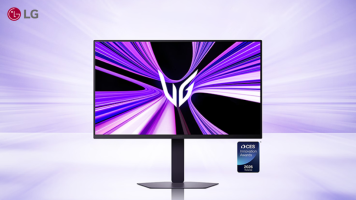
CES 2026 is here and LG is kicking things off with the announcement of a new line of gaming monitors they’re calling the Ultra Gear EVO series. So far, the lineup is composed of three models—the 39GX950B, 27GM950B and 52G930B—all of which offer features like 5K resolution and AI upscaling.
The 39-inch 39GX950B (or GX9) is a 21:9 ultrawide monitor that features a 1500R curve. Per LG, it’s designed to adapt to different gaming genres via a Dual Mode that allows the monitor to switch between running at 165 Hz at the full 5K resolution or at 330
by Steven Esposito · Posted
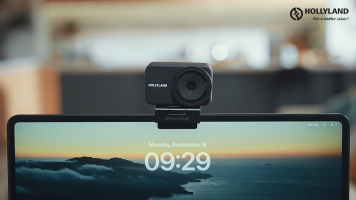
Hollyland launched its new Lyra UHD 4K Webcam, which offers high-quality video, auto-tracking, and Hi-Fi audio for users in the office and at home. No matter your position, the Lyra can keep you in the center of every moment without any sort of manual adjustment.
Hollyland Lyra UHD 4K Webcam
An