About 1099 filtered results

by Steven Esposito · Posted
Are you looking for some holiday gift giving inspiration? Good news, I am here to provide you with some of the coolest tech gifts you can find this year over at B&H Photo. From keyboards to mice, from under $50 to $250, we have something for everyone here! Come take a look at a few of our pics!
Under $50
Logitech K400 Plus Wireless Keyboard
Logitech, the peripheral masters, created a great device that allows you to sit back and control your desktop from a distance with the
by Steven Esposito · Posted
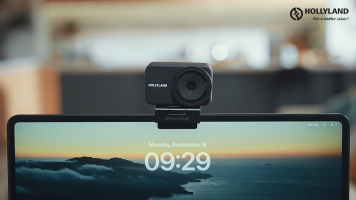
Hollyland launched its new Lyra UHD 4K Webcam, which offers high-quality video, auto-tracking, and Hi-Fi audio for users in the office and at home. No matter your position, the Lyra can keep you in the center of every moment without any sort of manual adjustment.
Hollyland Lyra UHD 4K Webcam
An

by Steven Esposito · Posted
2025 was a great year for consumer tech, though some of it may have flown under your radar. With that in mind, let’s take a look at some of the game-changing gear you might have missed. From productivity-boosting laptops to workflow-enhancing peripherals, here are some of our favorite devices.
Microsoft Surface Laptop Copilot+ PC
Finding a compact yet capable laptop can be challenging, but the Microsoft Surface Laptop

by Steven Esposito · Posted
2025 has been quite the year for technology to say the least! A bunch of brand-new hardware entered the fray while updated firmware drastically changed the way we interact with slightly older hardware. With themes of creativity and embracing longevity, I asked a few members of the B&H staff about their favorite products this year, and we have a wide range of devices here—from microphones and small cameras for content creation to devices made to enhance the gaming experience, take a look at what makes us tick.
Steven Esposito
DJI Mic Mini
I
by Steven Esposito · Posted
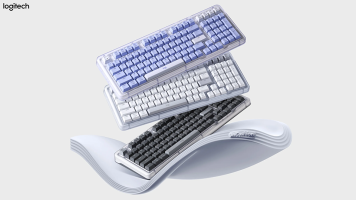
Logitech is happy to announces its latest wireless keyboard, the Alto Keys K98M. Coming in three different colors and utilizing gaming-like mechanical design, the Alto Keys elevate every keystroke, giving a satisfying typing experience. Standard keyboards tend to have a unified body experience with very little customization involved. Logitech adopted the concepts

by Steven Esposito · Posted
Right now we are in the middle of a huge transitional period in the world of computers. Resting well within the respite of hardware and software refreshes. On one level, Microsoft ended its support for Windows 10, meaning that users may have to either upgrade to Windows 11 or fully replace their aging systems. On another, we have a ton of hardware releasing at the perfect time, which is just before the holiday season really kicks off! If you are looking for an upgrade for any reason, you came to the right place at the right time. Let’s look at

by Steven Esposito · Posted
The world of technology is always changing. Devices that were meant to serve one purpose may be adjusted to fit many down the line. This makes it incredibly difficult to pinpoint exactly what the future may bring, but if we take a moment to look at what tends to be the biggest leaps forward, we can try to predict exactly what we are going to see. So, come take a look at some of the best predictions that I could make when it comes to technology in 2026.
Apple
When it comes to Apple, they have a pretty set release schedule. Recently they

Posted
Join Joe to learn how the Creality K2 Plus Combo Multi-Color 3D Printer lets you bring any idea to life!
0:00 - 3D Printing Lens Caps
0:45 - Key Specs
1:38 - 3D Printing Basics
2:02 - Color Filaments
3:08 - Dealing with Poop
3:39 - Creality Cloud
5:13 - Storing Files & Touch Screen Panel
5:44 - Assembling Prints
6:07 - The Result
Sponsored by

by Staff Writer · Posted
Learn more about the computers, monitors, tablets, and other tech accessories of the year, along with recommendations for different creator types, with B&H’s range of guides, product lists, and helpful features.

by Steven Esposito · Posted
You sit down at your desk and start up your system. As the fans whirl and the lights glow, ideas start to enter your mind. A collection of colors and designs begin to manifest within your mind. And as you begin to open up your software to bring your imagination to life, you wonder if this could all be done much quicker. Luckily for you, we are going to tell you about some of the best accessories to enhance your workflow. So, let’s take a look.
Logitech MX Master 3S

by Steven Esposito · Posted
When it comes to the gear computer professionals use, there are a ton of different tools they swear by—many of which you might not have heard of. With that in mind, today we'll be looking at the underrated tools pros swear by and how those tools can help improve and enhance your workflow.
Xcellon Pro Hub 10
I like to start out with a few devices like hubs! They are great for all sorts of scenarios like trying to expand the

Posted
Is there a laptop that can handle the demands of motion graphics and video editing? Sidney tries out the HP 14" ZBook Ultra G1a to see how it performs when working in Adobe Premiere Pro and After Effects. In this video, he puts the Ultra G1as battery and RAM to the test to see how it handles rendering, how smooth playback is, and more.
0:00 - Intro
0:25 - Specs
1:57 - Premiere Pro
4:08 - Z2 Mini G1A & HP Series 7 Pro 31.5" Monitor
5:51 - After Effects
8:16 - Is This for You?
Sponsored by

by Steven Esposito · Posted
You spent the last year taking photos and now the time has come to print out your favorites! Or better yet, maybe someone is paying you to print photos for them. Whether you are printing holiday cards, high-quality portraits, or photographic evidence of your neighbor using your pool without your permission, Epson is there to help. Today we are going to look at various Epson printers and how to create the optimal print station.
There are many different types of printers out there, some of which use unique technologies, offer different sizes,

by Steven Esposito · Posted
Promising the next big leap in performance, Apple unveiled its latest iPad Pro and 14” MacBook Pro devices, now equipped with the powerful and robust M5 processor. Developed on the third-generation 3nm technology, the latest M5 processor delivers greater CPU and GPU performance across the board.
Sporting a

by Steven Esposito · Posted
When it comes to building a creator studio, having the right equipment is key. Are you a designer? Maybe a podcaster? How about a video content creator? No matter what your specialty is, B&H has you covered. So, let’s take a look at a few items that can help streamline your setup.
Cables
Cables are always a necessity but are also solely dependent on the devices you are using. A lot of computers tend to have ample USB-A ports with one or two USB-C ports available. Xcellon offers a ton of these devices with the 6.6-foot